Netsensei

Much Ado About Nothing

Software en Programmeren

Mollom out of beta

Congratulations are in order as the Mollom guys went out of beta over the weekend. Great! They did several upgrades to their service over the past weeks including improving their spam deterrents and the visual CAPTCHA.

When you settle with a free account, Mollom allows 100 legit comments to be posted on your blog a day. More then enough for most blogs. Powerusers should sign up for their Mollom Plus Service which allows 10,000 legit comments a day. Ideal for enterprise sites, businesses and community services.

You can find more information on their blog.

Over the past weeks, I turned my attention to several other priorities. But then again, I fixed several bugs in the plugin. A new version of the API documentation was released on the 15th of september. Maintainers of third party clients should turn their attention to section 9 of the API. Mollom now features an elaborate load balancing/fail over act.

Short of a few bugs, I’m trying to work out a better way of handling errors in the plugin. So a new version of the plugin is in the works and a release should be right around the corner.
Bookmarks van September 2nd tot September 6th

WP Mollom “Back to school” 0.6.0

On the 1st of september, kids go back to school here in Belgium. And so, with a week to go, I was able to get a new release out. I intended it to be a bugfix release with version number 0.5.3, but I got a bit carried away and some feature creep happened. So I decided to give it version number 0.6.0.

Here’s the changelog:

  • fixed: html is preserved in a comment when the visitor is confronted with the captcha
  • fixed: handling of session id’s in show_captcha() en check_captcha() follows the API flow better.
  • fixed: broken bulk moderation of comments is now fixed
  • fixed: the IP adress was incorrectly passed to the ‘mollom.checkCaptcha’ call
  • fixed: the session_id is now passed correctly to _save_session() after the captcha is checked.
  • improved: more verbose status messages report when using the Mollom Manage module
  • improved: cleaned up some deprecated functions
  • improved: handling of Mollom feedback in _mollom_send_feedback() function
  • added: approve and unapprove options in the Mollom Manage module
  • added: link to the originating post in the Mollom Manage module
  • added: if a comment had to pass a CAPTCHA, it will be indicated in the Mollom Manage module
  • added: plugin has it’s own HTTP USER AGENT string which will be send with XML RPC calls to the API
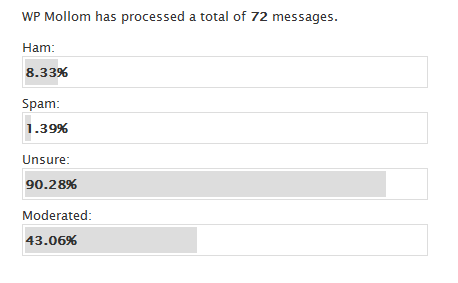
  • added: detailed statistics. You can find these under Plugins > Mollom

My personal favourite are the new statistics. I like shiny bar graphs. Dries and Benjamin let me use the flash object to generate statistics based on the data of their Mollom services. But I decided to keep some statistics on the ‘client’ i.e. your site’s side.

WP Mollom Statistics

How to install this shiny new version?

  1. If you have Akismet running: shut it down in the plugins panel.
  2. Upload wp-mollom.php in your plugins/ folder and activate the plugin.
  3. Get a public/private key by registering your site on mollom.com.
  4. Go to ‘settings’ in the WordPress Administration and configure the plugin.
  5. That’s it… your blog is protected by the forces of Mollom.

The idea is that Mollom takes away most of your moderation needs. But from time to time, you might get confronted with a false positive. In the ‘comments’ section of your WordPress Administration panel, you find the Mollom Moderation Module which gives you lots of control.

What are you waiting for? Just give it a go!

Mollom galore

So, Dries and Benjamin put out t-shirts to all those who contributed in a way to Mollom. If all went well, and Belgian postal services did their job, a package with a tee would be waiting for me at home right now. A big thank you!

Over the past days, there were some hiccups with the plugin not working that well. First, crack groups of rogues still get the better of the plugin. I also got spam in the moderation queue on a daily basis. The service is still under development and strategies are being devised to counter these attacks as we speak. Second, during debugging rounds in the past days, I encountered some anomalies against the API which will be fixed in the next version.

Yesterday, Dries, Benjamin discussed, amongst other things, Mollom over dinner in Antwerp. How s/w/could the service evolve in the future? I came home with a lot of ideas and todo’s. Bottomline is that the current version of the plugin is only the start.

I know, Mollom news isn’t what most of my regular readers interests. I got several remarks from people who rather like the lifelogs, the photos, the videos or the links. So I’m working on a plan to move all the techy stuff, not just Mollom, to it’s own seperate personal techblog in due time.

WP Mollom 0.5.2

So, I wrapped up version 0.5.2 of WP Mollom today. This release is all about fixing several bugs.

  • fixed: passing $comment instead of the direct input from $_POST to the show_captcha() and check_captcha() functions.
  • improved: implemented wpdb->prepare() in vunerable queries
  • improved: mollom_activate() function now more robust
  • changed: mollom_author_ip() reflects changes in the API documentation. This is to catch up on the abuse of proxies by spammers. If your host uses a reverse proxy and you know the ip(‘s), just enter them in the dashboard. The plugin takes care of the rest.

I tried to make the plugin compatible with the WP OpenID plugin over the past weeks. But no dice. Stable version 2.1.9 of WP OpenID doesn’t deal with extra fields added to the HTTP POST by other plugins when a request is send to wp-comments-post.php. This causes WP Mollom’s CAPTCHA form and subsequent checks to malfunction.

The good news is that Will Norris of WP OpenID is aware of the problem. The development version does contain a fix for this problem and is actually compatible with WP Mollom. You can check out a copy from the DiSo Project’s Google Code repository if you really want OpenID and Mollom support on your site.

As always: refer to the documentation regarding all the in’s and out’s.

WordPress 2.6 II

Voor zij die allerlei problemen hebben met inloggen na de upgrade naar WordPress 2.6: gewoon je cookiecache – of de specifiek cookies van WordPress – in je browser ledigen. En dan nog eens proberen om opnieuw in te loggen.

Wat is nu de oorzaak van dit probleem? Ryan Boren’s artikel SSL and Cookies in WordPress 2.6 legt het mooi uit. De beveiliging van het adminpaneel is in 2.6 verder opgedreven. Naast klassieke HTTP laat WordPress nu ook toe om te werken via HTTPS (HTTP over SSL) wat een stuk veiliger is. Technische details daar gelaten, liet WordPress vroeger 1 cookie achter die aangaf of je ingelogd was of niet. In de nieuwe versie ligt het anders: nu worden er 3 cookies gebruikt waarmee WordPress nagaat of je bent ingelogd en al dan niet gemachtigd om het adminpaneel te gebruiken.

Het is duidelijk dat bepaalde browsers na de upgrade halsstarrig vasthouden aan de oude pre-2.6 cookie in hun cache. Dat zorgt voor een loginprobleem. Door je cache manueel te legen zal WordPress automatisch 3 nieuwe cookies plaatsen wanneer je opnieuw probeert in te loggen.

WordPress 2.6

WordPress 2.6 just got released. It contains lots of bug fixes and new features. Like versioning if you work in a collaborative environment, a ‘press this’ button, extended gravatar support and much more. Watch the introductory movie on wordpress.org. 2.6 is named ‘Tyner’ after jazz pianist McCoy Tyner.

Of course, I’m going to test the plugin on 2.6 in the next couple of days.

Mollom vs Netsensei

Over the past days, there were some hiccups with WP Mollom on my blog. Comments that were kept back and the likes. I had an little bit outdated version of the plugin running. Of course, over the past weeks since 0.5.1, I received quite some feedback. And over the weekend, there was a small adjustement in the Mollom API.

So I took action and during my daily commute from and to Leuven, I took the time to fix things up. I’m now running a test version of 0.5.2 on my blog. I improved the SQL yet again (thanks, Ben!) and a bug in the CAPTCHA form.

So drop a me line in the comments and if things don’t work out, don’t hesitate to contact me!

If you’re really willing, you can always give the development version a go. It contains all the latest changes and updates, but might not be so stable.

WP Mollom featured on Mollom.com

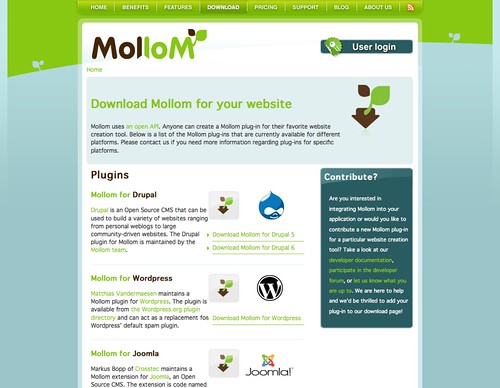
The plugin got featured over the weekend on mollom.com. It has now it’s own place in their downloadsection. How neat is that!

Mollom Featured

During my four days of relaxing at Rock Werchter, I received some much needed feedback from you. Over the weekend, I realized there are still an issue or two which needs taking care of. There was also a minor change in the API documentation which needs implementing.

WP Mollom “Holiday Edition” 0.5.1

I just released a minor update of WP Mollom with some bugfixes. This is the changelog:

  • Fixed: minor issues with the Captcha not being rendered correctly
  • Added: mollom_manage_wp_queue() function which adds Mollom support to the default comment administration panel
  • Improved: updating from a previous version is now more robust

More info and download on WordPress Extend

« Vorige blogposts Pagina 8 van 22 pagina's Volgende blogposts »