Netsensei

Much Ado About Nothing

Captcha

WP Mollom likes your comments

Over the past couple of days, it became apparent that WP Mollom suffers an issue where it “eats” your comment when a CAPTCHA is shown. The result is that only half of your comment is saved. Not good of course.  Apart from that, there was also a problem with character encoding.

Of course, this issue needs solving. I could recreate the problem on a testsetup and found the culprit. This issue rears its’ ugly head when a commenter uses double quotes in his/her comment. Because of the way WordPress implements commenting, I have to embed the commentdata in the CAPTCHA form as a cluster of hidden fields. The handling of the encoding was a bit wonky here which causes data to get corrupted.
WP Mollom 0.7.2

I just released version 0.7.2 of WP Mollom. Here’s the changelist

  • fixed: closing a gap that allowed bypassing checkContent through spoofing $_POST[‘mollom_sessionid’]
  • fixed: if mb_convert_encoding() is not available, the CAPTCHA would generate a PHP error. Now falls back to htmlentities().
  • improved: the check_trackback_content and check_comment_content are totally rewritten to make them more secure.
  • added: user roles capabilities. You can now exempt roles from a check by Mollom
  • added: simplified chinese translation

So, for the most part, this release is about security related under-the-hood changes. Another great adition is the use of user roles. With previous releases, you didn’t have to pass the Mollom check if you were logged in. Which was a bit of a security issue in it’s own. This release allows you to exempt certain user roles from Mollom scrutiny.

WP Mollom 0.7.1

I just released WP Mollom 0.7.1. Here’s the changelog:

  • fixed: all plugin panels are now shown in the new WP 2.7 administration interface menu
  • fixed: non-western character sets are now handled properly in the captcha form
  • fixed: handles threaded comments properly
  • fixed: multiple records in the manage module not correctly processed
  • improved: extra – non standard – fields added to the comment form don’t get dropped
  • improved: revamped the administration panel
  • improved: various smaller code improvements
  • added: the plugin is now compatible with the new plugin uninstall features in WordPress 2.7
  • added: the ‘quality’ of ‘spaminess’ of a comment is now logged and shown as an extra indicator

Wishing all the best in 2009!

Mollom 0.6.1

I just tagged version 0.6.1 of WP Mollom in the WordPress Extend repository. Which means in a few moments, you’ll be able to download the latest installment of my plugin.

So, what has changed? Well, this is a bugfix release which means no new features. Here’s the changelog:

  • Fixed: division by 0 error on line 317
  • Fixed: if ‘unsure’ but captcha was filled in correctly, HTML attributes in comment content would sometimes be eaten by kses
  • Improved: the mollom function got an overhaul to reflect the september 15 version of the Mollom API documentation
  • Changed: mollom statistics are now hooked in edit-comments.php instead of plugins.php
  • Added: _mollom_retrieve_server_list() function now handles all getServerList calls

Although almost all basic functions are up and running now, there’s still a long road ahead. Today, I’m happy with what I’ve accomplished technically so far, but such things as usability, performance, flexibility,… still need more work. For instance, there’s still no WordPress MU version, i8n support is still missing, the backend needs more simplifying and much more.

WP Mollom “Back to school” 0.6.0

On the 1st of september, kids go back to school here in Belgium. And so, with a week to go, I was able to get a new release out. I intended it to be a bugfix release with version number 0.5.3, but I got a bit carried away and some feature creep happened. So I decided to give it version number 0.6.0.

Here’s the changelog:

  • fixed: html is preserved in a comment when the visitor is confronted with the captcha
  • fixed: handling of session id’s in show_captcha() en check_captcha() follows the API flow better.
  • fixed: broken bulk moderation of comments is now fixed
  • fixed: the IP adress was incorrectly passed to the ‘mollom.checkCaptcha’ call
  • fixed: the session_id is now passed correctly to _save_session() after the captcha is checked.
  • improved: more verbose status messages report when using the Mollom Manage module
  • improved: cleaned up some deprecated functions
  • improved: handling of Mollom feedback in _mollom_send_feedback() function
  • added: approve and unapprove options in the Mollom Manage module
  • added: link to the originating post in the Mollom Manage module
  • added: if a comment had to pass a CAPTCHA, it will be indicated in the Mollom Manage module
  • added: plugin has it’s own HTTP USER AGENT string which will be send with XML RPC calls to the API
  • added: detailed statistics. You can find these under Plugins > Mollom

My personal favourite are the new statistics. I like shiny bar graphs. Dries and Benjamin let me use the flash object to generate statistics based on the data of their Mollom services. But I decided to keep some statistics on the ‘client’ i.e. your site’s side.

WP Mollom 0.5.2

So, I wrapped up version 0.5.2 of WP Mollom today. This release is all about fixing several bugs.

  • fixed: passing $comment instead of the direct input from $_POST to the show_captcha() and check_captcha() functions.
  • improved: implemented wpdb->prepare() in vunerable queries
  • improved: mollom_activate() function now more robust
  • changed: mollom_author_ip() reflects changes in the API documentation. This is to catch up on the abuse of proxies by spammers. If your host uses a reverse proxy and you know the ip(‘s), just enter them in the dashboard. The plugin takes care of the rest.

I tried to make the plugin compatible with the WP OpenID plugin over the past weeks. But no dice. Stable version 2.1.9 of WP OpenID doesn’t deal with extra fields added to the HTTP POST by other plugins when a request is send to wp-comments-post.php. This causes WP Mollom’s CAPTCHA form and subsequent checks to malfunction.

Mollom vs Netsensei

Over the past days, there were some hiccups with WP Mollom on my blog. Comments that were kept back and the likes. I had an little bit outdated version of the plugin running. Of course, over the past weeks since 0.5.1, I received quite some feedback. And over the weekend, there was a small adjustement in the Mollom API.

So I took action and during my daily commute from and to Leuven, I took the time to fix things up. I’m now running a test version of 0.5.2 on my blog. I improved the SQL yet again (thanks, Ben!) and a bug in the CAPTCHA form.

WP Mollom “Holiday Edition” 0.5.1

I just released a minor update of WP Mollom with some bugfixes. This is the changelog:

  • Fixed: minor issues with the Captcha not being rendered correctly
  • Added: mollom_manage_wp_queue() function which adds Mollom support to the default comment administration panel
  • Improved: updating from a previous version is now more robust

More info and download on WordPress Extend

Mollom workflow

Dries made me a nice diagram on the process flow of Mollom. It shows the order in which your Mollom programmable should excute the different API calls.

Note: You should never try to save data to the database before all the Mollom checks including the CAPTCHA have been cleared. The idea is that through the challenge-response flow, the contributor has to validated him/herself as a human instead of forcing the administrator to make an educated guess.

Statistics for Mollom

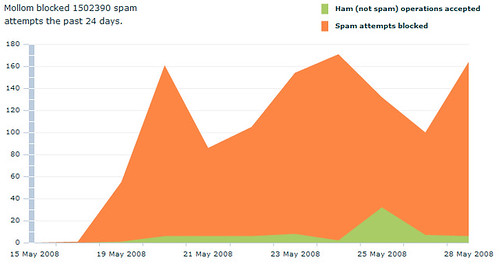
Because numbers and graphics can express so much more then words: a visualisation of how Mollom is protecting my blog against spam. I’ve been testing my plugin on and off for the past 2 weeks on my own blog.

Mollom for WordPress

The new beta release is almost ready by the way. Just need to pack and ship it to the testers tonight. So here’s what’s new:

  • Decoupled moderation from the CAPTCHA test. Moderation is now optional. If you fail to complete the CAPTCHA, your comment is not saved to the database.
  • Major improvement of the error handling. I dove into WordPress’ error handling. I think people should make more use of the WP_Error class in combination with wp_die(). Maybe I’ll do a small item on that one.
  • I added trackback support. Of course, displaying CAPTCHA’s for trackbacks isn’t going to work. So after discussing it with Dries, instead of trying to solve the CAPTCHA problem, those trackbacks are blocked as well.

As things get finalized, I’m thinking about doing a very first public beta release sometime next week. I had very few feedback from testers so far in fact. If people are still interested in joining me for a last spin: drop me a line!

« Vorige blogpostsPagina 1 van 2 pagina'sVolgende blogposts »