Netsensei

Much Ado About Nothing

Software en Programmeren

Mollom 0.5.0 out now!

It took me the better part of June to prepare a new version of Mollom. But today I released version 0.5.0. You can download the package here.

So, a lot has changed since version 0.4.0…

  • I rewrote the SQL after this suggestion on Pressed Words. Mollom now uses it’s own table to store all it’s data instead of fumbling with the WordPress data model.
  • I fixed the incompatibility issues with WordPress OpenID plugin.
  • Improved the error handling.
  • Status messages are now a lot more verbose
  • Added the mollom_moderate_comment($comment_id) tag for use in templates and themes. This allows direct moderation of a comment without first having to go to the dashboard.
  • … a lot more!

So download, go forth and protect your blog against those vile spammers through Mollom!

del.icio.us fail

Sinds eind maart is het dagelijkse linksvoer hier wat weg gevallen. Ook bij anderen heb ik willen merken dat er sinds enkele weken geen digests met bookmarks worden gepubliceerd.

Wat we eigenlijk doen is gebruik maken van een experimentele functie van del.icio.us. Je kan een job instellen die elke dag op een bepaald uur de links van die dag verzameld en automatisch op je blog doet publiceren. Ik ben even terug gaan kijken naar de instellingen om te ontdekken dat de laatste keer dat de job liep op 25 maart was. Zonder resultaat.

Op het interwebs vind je vrij weinig informatie over wat er precies gaande is. Blijkbaar is het niet iets waar veel mensen van gebruik maken, of het valt gewoon niet op. Ook vanuit del.icio.us zelf is er geen communicatie hierover. Maar in dit Yahoo!Groups postje legt Nick Nguyen, senior product manager bij Del.icio.us, uit dat de feature voorlopig in reparatie is zonder ETA. Beetje jammer eigenlijk… want ik heb niet bepaald veel zin om terug te knoeien met allerlei plugins en RSS feeds.

WP Mollom and WP OpenID

These two weren’t the best friends over the past couple of weeks. Since someone notified me they weren’t compatible, it took some time to figure out what was going wrong. My initial suspects was an icky way of dealing with the action hooks. Either by my plugin or WP OpenID. But after extensive testing, I concluded that the order in which the action hooks call the different plugin functions, wasn’t problem.

I identified the problem as the comment data getting lost somewhere along the way. I tested the OpenID plugin and the transition to the Mollom plugin. In the end, I could narrow the problem down to odd behaviour of global variables in WordPress. Let’s take a look at this bit of code:

<br> function dosomething($ds_comment) {<br> global $ds_comment;<br> print_r($ds_comment);<br> return $ds_comment;<br> }<br> add_action('preprocess_comment', 'dosomething');<br>

For brevity’s sake, I ommitted the obligatory WordPress plugin header. But if you add it, put this bit in a seperate file, upload it to your plugins/ folder and activate. Now you can test if yourself. The idea is that the array containing the commentdata is shown in your browser just before putting it in the database (notice that your browser doesn’t redirect to the original page, but that’s not the issue here). In reality, you’ll get a blanco page. Meaning the array $ds_comment is in fact empty. Further on, you’ll just pass empty variables and in the end save an empty record to your database. The comment got lost into cyberoblivion. Not very nice.

Now. Just comment out or remove the global $ds_comment; bit and try again. Now, if you submit a new comment, the data will be output to the browser nicely.

Conclusion: If you make the very same variable that was passed as an argument through the function, global, the data just gets lost. Very odd. Now, if you create a new, empty, global variable within the function and assign the data from $ds_comment to it, there is no problem whatsoever.

I wonder how this could happen…

Ow. Making a lot of variables global, especially those with sensitive data, is not really best practice. There are more gracious ways of passing data around like OO programming design or paying attention to correct function reuse. In a future incarnation, I’ll try to reduce the amount of globals I use. For now, I just want the damn thing to behave like it should. 😉
It’s out!

Well, nothing more to say for now: it’s out. You can download and play with it. It’s a first beta version so beasts can roar it’s head if you have a heavily customized wordpress installation with loads of plugins. Please, drop me a line with all your feedback, code, concerns, requests!

A big thank you to Dries, Benjamin, the testers and all those people that supported me!

Release of WP Mollom

So. I scheduled a first public beta release of my Mollom plugin somewhere tonight (CET/UTC+1). The plugin runs quite stable on my own weblog and spam is happily being blocked. I didn’t receive major complaints from testers or users on my own blog in the past week. Yesterday, I cleared the code with Dries who took a glance at the major functionality.

Of course, it wouldn’t be a first beta release if there aren’t still some irks lurking around in the code. This morning, Leo Arias mailed me that the plugin won’t work together with the WP OpenId plugin. Having toyed with my own OpenID implementation for WordPress, I’m not a great proponent of this technology. The way you have to design a plugin implies using several shortcuts. I’m not going to push my release back now, though. I will try to fix this issue in the next release.

My code will also be thoroughly reviewed by the Mollom people.

Thanks to all the testers and those who just listed to become a tester!

Mollom workflow

Dries made me a nice diagram on the process flow of Mollom. It shows the order in which your Mollom programmable should excute the different API calls.

Note: You should never try to save data to the database before all the Mollom checks including the CAPTCHA have been cleared. The idea is that through the challenge-response flow, the contributor has to validated him/herself as a human instead of forcing the administrator to make an educated guess.

As for the plugin itself: I noticed several small booboo’s myself over the weekend and sorted them out. A public release should be very soon-ish.

Statistics for Mollom

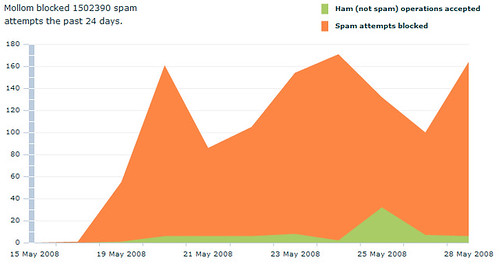
Because numbers and graphics can express so much more then words: a visualisation of how Mollom is protecting my blog against spam. I’ve been testing my plugin on and off for the past 2 weeks on my own blog.

Mollom for WordPress

The new beta release is almost ready by the way. Just need to pack and ship it to the testers tonight. So here’s what’s new:

  • Decoupled moderation from the CAPTCHA test. Moderation is now optional. If you fail to complete the CAPTCHA, your comment is not saved to the database.
  • Major improvement of the error handling. I dove into WordPress’ error handling. I think people should make more use of the WP_Error class in combination with wp_die(). Maybe I’ll do a small item on that one.
  • I added trackback support. Of course, displaying CAPTCHA’s for trackbacks isn’t going to work. So after discussing it with Dries, instead of trying to solve the CAPTCHA problem, those trackbacks are blocked as well.

As things get finalized, I’m thinking about doing a very first public beta release sometime next week. I had very few feedback from testers so far in fact. If people are still interested in joining me for a last spin: drop me a line!

To moderate… or not?

Well, I adjusted some of the plugin code over the weekend. The comments’ data (name, e-mail, url, content) isn’t stored in the database anymore but embedded in the CAPTCHA form as a collection of hidden fields. As I don’t want to store the data clientside (cookies and the likes) this seems to be the best way out. The comment is saved only if the CAPTCHA test was succesfully completed.

A particular issue I face are special characters like backslashes, quotes,… things you might encounter in URL’s and such. Luckily, WordPress is quite flexible as it takes this into account during the process of saving a comment in the database. The issue I have to focus on is not breaking the HTML CAPTCHA form itself. This will probably need some extensive testing.

The new version is already protecting this blog against comment spam. If everything goes well, the moderation queue should stay empty of unprocessable spam. In fact, it changes the usage of the queue entirely: instead of an indispensable tool, it becomes an optional means to teach Mollom if a message contains spam, profanity,… You don’t need to use it, but it allows you to correct Mollom in those few cases that may slip through.

Next up: implement functionality against trackback spam. I hope to get that part finished near the end of next week so I can put out a new betaversion of the plugin.

To moderate… or not?

Today, I had an e-mail discussion with Dries and Benjamin over the use of a moderation queue within the context Mollom provides. I have on implemented in my plugin. The idea is that ‘unsure’ comments that don’t get through the CAPTCHA test, land in a moderation queue… sort of.

Mollom was actually designed to get rid of the queue. Checking if a commenter is human or a spambot happens through the CAPTCHA test. Early on in the process of posting a comment. That makes a queue where an administrator has to do the check after the facts quite unnecessary.

The problem is that the way I designed the plugin forced me use a moderation queue altogether. ‘Unsure’ labelled comments happen to land in the database, before the CAPTCHA check. Two months ago, that seemed the logical way out to me. Dries gave me some more insight in the workings of the Drupal module and was able to convince me to seperate the CAPTCHA check from the moderation queue. (I am not nearly into Drupal as I am into the workings of WordPress!)

So. It’s a bit back to the drawingboard for me as this means some parts of the plugin need to be reviewed.

Mollom going strong

Okay. It’s been almost two weeks since I released the first installment of my Mollom plugin to the testers. I got some feedback and started hacking away. I’m almost ready to release a new betaversion. So, here’s a list of what’s been improved:

  • Added: bulk moderation of unmoderated comments
  • Added: policy mode. If Mollom services are down, you can choose to automattically restrict access to commenting
  • Improved: when the plugin is deactivated, the database is restored to it’s previous state (all Mollom related data will be removed)
  • Improved: only comments with a mollom session id are now shown in the mollom moderation queue (relevance)
  • Improved: assigning a mollom session id to a comment
  • Improved: the moderation queue interface is more userfriendly
  • Improved: Configuration of the plugin
  • Improved: error handling

As you can guess, I’ve not implemented trackback support yet. Dries and Benjamin suggested to send ‘unsure’ trackbacks to the moderation queue and skip the whole CAPTCHA part. I’m going to implement and release that one in the last testversion.

On a sidenote: I didn’t take into account that the plugin should work with WordPress MU but one of the testers tried it anyway. Apparently, next to a few minor bugs, the plugin seemed to function. Which is a nice bonus.

I still need testers, though. The more the better. So if people are interested to take part: please mail me!

« Vorige blogposts Pagina 9 van 22 pagina's Volgende blogposts »