Netsensei

Much Ado About Nothing

Plugin

WP Mollom and WP OpenID

These two weren’t the best friends over the past couple of weeks. Since someone notified me they weren’t compatible, it took some time to figure out what was going wrong. My initial suspects was an icky way of dealing with the action hooks. Either by my plugin or WP OpenID. But after extensive testing, I concluded that the order in which the action hooks call the different plugin functions, wasn’t problem.
I identified the problem as the comment data getting lost somewhere along the way. I tested the OpenID plugin and the transition to the Mollom plugin. In the end, I could narrow the problem down to odd behaviour of global variables in WordPress. Let’s take a look at this bit of code:

<br> function dosomething($ds_comment) {<br> global $ds_comment;<br> print_r($ds_comment);<br> return $ds_comment;<br> }<br> add_action('preprocess_comment', 'dosomething');<br>

For brevity’s sake, I ommitted the obligatory WordPress plugin header. But if you add it, put this bit in a seperate file, upload it to your plugins/ folder and activate. Now you can test if yourself. The idea is that the array containing the commentdata is shown in your browser just before putting it in the database (notice that your browser doesn’t redirect to the original page, but that’s not the issue here). In reality, you’ll get a blanco page. Meaning the array $ds_comment is in fact empty. Further on, you’ll just pass empty variables and in the end save an empty record to your database. The comment got lost into cyberoblivion. Not very nice.

Now. Just comment out or remove the global $ds_comment; bit and try again. Now, if you submit a new comment, the data will be output to the browser nicely.

Conclusion: If you make the very same variable that was passed as an argument through the function, global, the data just gets lost. Very odd. Now, if you create a new, empty, global variable within the function and assign the data from $ds_comment to it, there is no problem whatsoever.

I wonder how this could happen…

Ow. Making a lot of variables global, especially those with sensitive data, is not really best practice. There are more gracious ways of passing data around like OO programming design or paying attention to correct function reuse. In a future incarnation, I’ll try to reduce the amount of globals I use. For now, I just want the damn thing to behave like it should. 😉

Release of WP Mollom

So. I scheduled a first public beta release of my Mollom plugin somewhere tonight (CET/UTC+1). The plugin runs quite stable on my own weblog and spam is happily being blocked. I didn’t receive major complaints from testers or users on my own blog in the past week. Yesterday, I cleared the code with Dries who took a glance at the major functionality.

Of course, it wouldn’t be a first beta release if there aren’t still some irks lurking around in the code. This morning, Leo Arias mailed me that the plugin won’t work together with the WP OpenId plugin. Having toyed with my own OpenID implementation for WordPress, I’m not a great proponent of this technology. The way you have to design a plugin implies using several shortcuts. I’m not going to push my release back now, though. I will try to fix this issue in the next release.

My code will also be thoroughly reviewed by the Mollom people.

Thanks to all the testers and those who just listed to become a tester!

Mollom workflow

Dries made me a nice diagram on the process flow of Mollom. It shows the order in which your Mollom programmable should excute the different API calls.

Note: You should never try to save data to the database before all the Mollom checks including the CAPTCHA have been cleared. The idea is that through the challenge-response flow, the contributor has to validated him/herself as a human instead of forcing the administrator to make an educated guess.

As for the plugin itself: I noticed several small booboo’s myself over the weekend and sorted them out. A public release should be very soon-ish.

Statistics for Mollom

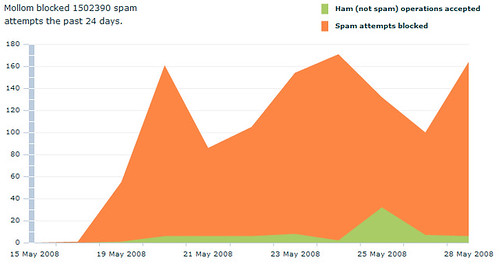
Because numbers and graphics can express so much more then words: a visualisation of how Mollom is protecting my blog against spam. I’ve been testing my plugin on and off for the past 2 weeks on my own blog.

Mollom for WordPress

The new beta release is almost ready by the way. Just need to pack and ship it to the testers tonight. So here’s what’s new:

  • Decoupled moderation from the CAPTCHA test. Moderation is now optional. If you fail to complete the CAPTCHA, your comment is not saved to the database.
  • Major improvement of the error handling. I dove into WordPress’ error handling. I think people should make more use of the WP_Error class in combination with wp_die(). Maybe I’ll do a small item on that one.
  • I added trackback support. Of course, displaying CAPTCHA’s for trackbacks isn’t going to work. So after discussing it with Dries, instead of trying to solve the CAPTCHA problem, those trackbacks are blocked as well.

As things get finalized, I’m thinking about doing a very first public beta release sometime next week. I had very few feedback from testers so far in fact. If people are still interested in joining me for a last spin: drop me a line!

To moderate… or not?

Well, I adjusted some of the plugin code over the weekend. The comments’ data (name, e-mail, url, content) isn’t stored in the database anymore but embedded in the CAPTCHA form as a collection of hidden fields. As I don’t want to store the data clientside (cookies and the likes) this seems to be the best way out. The comment is saved only if the CAPTCHA test was succesfully completed.

A particular issue I face are special characters like backslashes, quotes,… things you might encounter in URL’s and such. Luckily, WordPress is quite flexible as it takes this into account during the process of saving a comment in the database. The issue I have to focus on is not breaking the HTML CAPTCHA form itself. This will probably need some extensive testing.

The new version is already protecting this blog against comment spam. If everything goes well, the moderation queue should stay empty of unprocessable spam. In fact, it changes the usage of the queue entirely: instead of an indispensable tool, it becomes an optional means to teach Mollom if a message contains spam, profanity,… You don’t need to use it, but it allows you to correct Mollom in those few cases that may slip through.

Next up: implement functionality against trackback spam. I hope to get that part finished near the end of next week so I can put out a new betaversion of the plugin.

Mollom for WordPress III

A little progress update on my Mollom for WordPress plugin. The past ten days some unexpected real life events kept me back from programming. No worry, I hope to do some hacking in the upcoming long weekend.

So, where do I stand? Well, I just need to implement the last necessary feature: the moderation queue and feedback module that catches the last 0.1% of (unsure/spammy) messages that Mollom can’t process itself. Shouldn’t be much more than an afternoon’s work though.

More important: it’s testing time! I’m in need of people who want to put the plugin to the test and who want to send me some feedback. Areas that need testing are: effectiveness of the spamfilter, usability (easy install, easy use), code (did I write it properly? What could/should be optimized?)

You can drop me a line on my mailadres matthias apetail netsensei dot nl if you want to take part, and I’ll send you the plugin. Important note: you need a stand alone installation of WordPress. The plugin doesn’t work with wordpress.com hosted blogs.

Mollom voor WordPress ii

Zo. We zijn een half dagje verder. Dit is de tussenstand: 0 spammers door de mazen van het net gegelipt. 7 spams in de moderation queue waarvan er 3 door jullie werden achtergelaten. 1 spam (Houbi) per ongeluk in de moderation queue blijven hangen. Niettegenstaande de mens legit is.

Kijk, voorlopig laat ik alles daar even hangen. Ik moet nog een feedback module in mijn plugin hangen zodat ik de Mollom servers kan terugsturen waarom iets wel of niet spam/profanity/unwanted/… is.

Tenslotte blijkt er inderdaad iets loos te zijn met het tonen van de image CAPTCHA’s. Da’s alvast doorgegeven.

Al bij al een klein succesje denk ik dan zo.

Mollom voor WordPress

Oké mensen. Tijd voor het moment van de waarheid. De laatste maand heb ik tussendoor, voornamelijk op de trein, geprogrammeerd aan een plugin voor WordPress. Niet zomaar een plugin, maar eentje die het de diensten van Mollom, de startup van Dries Buytaert en Benjamin Schrauwen, ook voor WordPress gebruikers toegankelijk maakt.mollom logo

Ik huldig eigenlijk het principe eat your own dogfood. En om eens te kijken hoe sterk mijn plugin reeds staat, zet ik die bij wijze van allereerste publieke test in op mijn eigenste blogje. Akismet en Spam Karma heb ik voor de gelegenheid gewoon uitgeschakeld. Vanaf nu worden jullie comments door de spamfilters van Mollom gehaald.

Hoe werkt het? Bij een normale comment zal je niets merken van het werk dat Mollom achter de scherm uitvoert. Stel dat je een spambot bent, dan wordt je bijdrage gewoon geweigerd nog voor er wordpress een query op de database uitvoert. Moest er nu twijfel bestaan over de legitimiteit, dan wordt je comment in moderatie gehouden en krijg je een eenvoudig testje voorgeschoteld om te bevestigen dat je wel degelijk een persoon bent met de allerbeste bedoelingen.

Mollom for WordPress

Bij wijze van proef mogen jullie je even in de commentaren van deze post laten gaan. Het gaat om een proef om de basisfunctionaliteit van de plugin te verbeteren. Verder gaat het er mij nu om een aantal secundaire doeleinden op korte termijn te implementeren. Bij problemen of opmerkingen kan je mij altijd op mijn mailadres, matthias apestaartje netsensei puntje nl, contacteren.

Do your worst‘ zou ik zeggen!

O ja, ik ben Benjamin en Dries alvast heel erg dankbaar voor de steun en de feedback van de afgelopen weken!

English readers:

Yes, I’ve been working on a plugin that brings Mollom to WordPress. I’ve enabled my plugin on this blog to protect it from spam through Mollom. This is a preliminary test for the basic, barebones functionality of the plugin: filtering out spam. Unless you’re a spambot, you should have no trouble posting comments. Keep an eye out for the CAPTCHA test, though. If you run into problems or you have suggestions, don’t hestitate to contact me: matthias apetail netsensei dot nl. A big thank you to Dries and Benjamin for their support in these past weeks.

Operation aborted

Hm. Blijkbaar was mijn blogje de laatste dagen moeilijk bereikbaar voor Internet Explorer gebruikers. Die kregen een gortdroge ‘operation aborted’ error te zien. Even nagedacht wat ik fout kon hebben gedaan de laatste dagen. Ik moest kijken in de richting van de plugins die ik heb geïnstalleerd. Na wat in- en uitschakelen en testen blijkt nu dat de de slightbox plugin de boosdoener is. Op dit moment lijkt het probleem van de baan te zijn.

Ondertussen vond ik ook nog bevestiging via Google. Terug naar de tekentafel terug en op zoek naar een betere lightbox plugin.

Ik kan natuurlijk ook verlangen naar een ideale wereld waarin mensen (hun oude) Internet Explorer gewoon dumpen voor een alternatief dat wél werkt zonder cryptische foutboodschappen.

Widgetizing

Hm. Ik hotlinkte de voorbije dagen naar een plaatje op een andere site. Fout van mij want de snoodaards haalden het plaatje weg en op mijn blogje ontstond een gapend zwart gat. Tijd dus om even na te denken wat ik met de vrijgekomen ruimte kon doen. In eerste dacht ik aan één of ander sociaal geëngageerd project met esthetisch verantwoord promomateriaal. Maar die zijn nogal dun bezaaid blijkbaar. En ik moet natuurlijk nog voor de zaak zijn. Platte commercie misschien? Huishoudtoestellen zoals koelkasten en krultangen zie ik zo keihard niet zitten. En een lelijke flashende banner al helemaal niet. Onder het motto ‘doe een ander niet aan wat gij zelf niet wilt’ ook dat idee naar de prullenbak verwezen. (hoe sympathiek de jongens en meisjes bij adhese en zo wel niet zijn!)

Uiteindelijk is het Twitter geworden. Een leuke custom CSS badge met mijn updates. De officiële badges vond ik spuuglelijk dus op zoek naar een goeie WordPress plugin. Ik vond er eentje die mij aanstond maar na installatie bleek mijn sidebar niet widgetfähig te zijn. Geen nood. Dan maar dit document gevolgd en het nodige gedaan. Al snel blijkt het vervangen van de huidige plugins door widgets nogal ingrijpend te zijn. Toch voor een werkje waar ik een half uurtje voor had uitgetrokken. Ik denk dus dat ik mij daar dit weekend eens mee ga bezigen.

« Vorige blogposts Pagina 2 van 4 pagina's Volgende blogposts »