Netsensei

Much Ado About Nothing

Moderatie

WP Mollom “Back to school” 0.6.0

On the 1st of september, kids go back to school here in Belgium. And so, with a week to go, I was able to get a new release out. I intended it to be a bugfix release with version number 0.5.3, but I got a bit carried away and some feature creep happened. So I decided to give it version number 0.6.0.

Here’s the changelog:

  • fixed: html is preserved in a comment when the visitor is confronted with the captcha
  • fixed: handling of session id’s in show_captcha() en check_captcha() follows the API flow better.
  • fixed: broken bulk moderation of comments is now fixed
  • fixed: the IP adress was incorrectly passed to the ‘mollom.checkCaptcha’ call
  • fixed: the session_id is now passed correctly to _save_session() after the captcha is checked.
  • improved: more verbose status messages report when using the Mollom Manage module
  • improved: cleaned up some deprecated functions
  • improved: handling of Mollom feedback in _mollom_send_feedback() function
  • added: approve and unapprove options in the Mollom Manage module
  • added: link to the originating post in the Mollom Manage module
  • added: if a comment had to pass a CAPTCHA, it will be indicated in the Mollom Manage module
  • added: plugin has it’s own HTTP USER AGENT string which will be send with XML RPC calls to the API
  • added: detailed statistics. You can find these under Plugins > Mollom

My personal favourite are the new statistics. I like shiny bar graphs. Dries and Benjamin let me use the flash object to generate statistics based on the data of their Mollom services. But I decided to keep some statistics on the ‘client’ i.e. your site’s side.
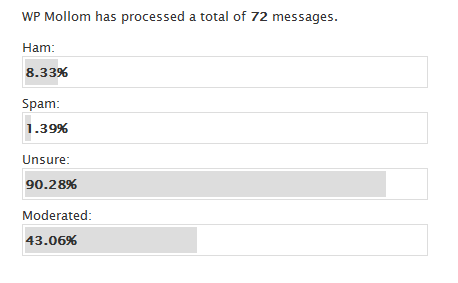
WP Mollom Statistics

How to install this shiny new version?

  1. If you have Akismet running: shut it down in the plugins panel.
  2. Upload wp-mollom.php in your plugins/ folder and activate the plugin.
  3. Get a public/private key by registering your site on mollom.com.
  4. Go to ‘settings’ in the WordPress Administration and configure the plugin.
  5. That’s it… your blog is protected by the forces of Mollom.

The idea is that Mollom takes away most of your moderation needs. But from time to time, you might get confronted with a false positive. In the ‘comments’ section of your WordPress Administration panel, you find the Mollom Moderation Module which gives you lots of control.

What are you waiting for? Just give it a go!

Mollom 0.5.0 out now!

It took me the better part of June to prepare a new version of Mollom. But today I released version 0.5.0. You can download the package here.

So, a lot has changed since version 0.4.0…

  • I rewrote the SQL after this suggestion on Pressed Words. Mollom now uses it’s own table to store all it’s data instead of fumbling with the WordPress data model.
  • I fixed the incompatibility issues with WordPress OpenID plugin.
  • Improved the error handling.
  • Status messages are now a lot more verbose
  • Added the mollom_moderate_comment($comment_id) tag for use in templates and themes. This allows direct moderation of a comment without first having to go to the dashboard.
  • … a lot more!

So download, go forth and protect your blog against those vile spammers through Mollom!

Mollom vs Trackback spam

Hum. The plugin in WordPress doesn’t support trackback checking yet. No big deal? Well, I have 24 spams in my moderation queue, the majority of them are trackback spam.

So… yet another feature to implement. Just wondering how the flow of operations should look like. Moreover: how/where do I implement a CAPTCHA? Is it necessary to do this implement? Given the 99.8% accuracy Mollom claims, is it a bad thing if a trackback would be identified as a false positive and the CAPTCHA step is skipped altogether? One can retrieve the false positive through the moderation queue altogheter, no?

Anyway, adding trackback support should be fairly simple.

Mollom for WordPress iv

Yesterday, I made a last codingscram and implemented the entire feedback/moderationqueue in the dashboard. It works acceptable enough to put out a very rough betaversion out to the testers. Which I did yesterday-evening. I’m very curious about their feedback. I’ve already listed some points that will need improvement.

If you’d like to participate in testing please mail me!! Remember Eric Raymond’s famous aphorism: give enough eyeballs, all bugs are shallow!

On the train to Antwerp. I got this idea: If a comment goes into the moderation queue, WordPress automatically sends out an e-mail to warn the site administrator. It would be such a breeze if the user could moderate and send feedback to Mollom through links in that e-mail instead of opening a browerwindow, go to the dashboard and start moderating.

Apparently, Field Commander Wieers got the same idea. Another optional feature I would like to add is the addition of a rel='nofollow' on every link that’s being posted in the comments. Something that could be very easily accomplished through the multiple comments hooks WordPress provides.

Mollom for WordPress III

A little progress update on my Mollom for WordPress plugin. The past ten days some unexpected real life events kept me back from programming. No worry, I hope to do some hacking in the upcoming long weekend.

So, where do I stand? Well, I just need to implement the last necessary feature: the moderation queue and feedback module that catches the last 0.1% of (unsure/spammy) messages that Mollom can’t process itself. Shouldn’t be much more than an afternoon’s work though.

More important: it’s testing time! I’m in need of people who want to put the plugin to the test and who want to send me some feedback. Areas that need testing are: effectiveness of the spamfilter, usability (easy install, easy use), code (did I write it properly? What could/should be optimized?)

You can drop me a line on my mailadres matthias apetail netsensei dot nl if you want to take part, and I’ll send you the plugin. Important note: you need a stand alone installation of WordPress. The plugin doesn’t work with wordpress.com hosted blogs.

Mollom voor WordPress ii

Zo. We zijn een half dagje verder. Dit is de tussenstand: 0 spammers door de mazen van het net gegelipt. 7 spams in de moderation queue waarvan er 3 door jullie werden achtergelaten. 1 spam (Houbi) per ongeluk in de moderation queue blijven hangen. Niettegenstaande de mens legit is.

Kijk, voorlopig laat ik alles daar even hangen. Ik moet nog een feedback module in mijn plugin hangen zodat ik de Mollom servers kan terugsturen waarom iets wel of niet spam/profanity/unwanted/… is.

Tenslotte blijkt er inderdaad iets loos te zijn met het tonen van de image CAPTCHA’s. Da’s alvast doorgegeven.

Al bij al een klein succesje denk ik dan zo.

« Vorige blogposts Pagina 1 van 1 pagina's