Netsensei

Much Ado About Nothing

Christina

Wat celebrities betreft heb ik zo’n beetje een haat/liefde verhouding met Christina Aguillera. Ze is een veelzijdige artieste en door de jaren is ze flink gegroeid. In het begin was ze het zoveelste sterretje dat meesurfte op de britneygolf van de late jaren ’90. Daarna stuikte ze in de ganse hiphop, bling-bling hype dominantie die het begin van de 21ste eeuw kenmerkte. Een hype die ik een dieptepunt voor contemporaine popmuziek vond, eerlijk gezegd.

Tegenwoordig ligt het anders. Nu ik steeds meer clips zie uit haar nieuwe ‘Back to Basics’ wint ze punten bij mij want haar stem, die vind ik toch wel fenomenaal. En die komt nu eindelijk eens tot haar recht.

Haar laatste clip, Candyman, is voor mij toch een schot in de roos. Gans het jaren ’40 gevoel! USO, vrouwen in de fabriek, swingende nachtclubs op het einde van de oorlog,… Afijn, het is een wereld van verschil met het sletterige Dirty van enkele jaren geleden. Dit is haar gewoon veel beter op het lijf geschreven.

Meer van dat!

Ubuntu versus iBook

Als ik nog even mag doorneuten over Ubuntu op mijn iBook. Hoewel mijn eerste indrukken positief waren, heb ik ondertussen enkele ergernissen ontdekt.

  • Rechtermuisklikken zit er – uiteraard – niet in. Ik moet mij behelpen met F11 en F12 om mijn muisknop te emuleren. Afijn, ik ben al blij dat het überhaupt mogelijk is.
  • Mijn keyboard is een azerty versie van de standaard apple lay-out. Qua zeldzame varieteit kan dat tellen. Logisch gevolg is dat niet alle toetsen/combinaties doen wat ik zou willen.
  • Om de één of andere reden wordt mijn iBook zeer snel warm. Iets wat ik niet ondervind in OSX. Ik ben dan nog maar gewoon aan het surfen. Wat als ik er eens wat harder werk op wil presteren? Ik had zelfs gehoopt om Beryl aan de klap te krijgen. Dat zou een aanslag betekenen. Niet direct een optie dus.
  • Mijn grootste ergernis is de kapotte suspend functie. Klap ik mijn laptop dicht, dan krijg ik die nadien niet meer terug wakker wanneer ik ze terug open. Naar het schijnt werkte die wel in Dapper. In Edgy dus niet. Bijzonder jammer!

De eerste twee ergernissen vallen nog wel zelf op te lossen, maar de laatste twee… daar heb ik toch niet zo heel veel support over gevonden. Er zijn wel bugreports over, maar het is niet alsof de developers van Edgy daar veel gevolg aan schijnen te geven.

Avond

Na een lange werkdag doet het deugd om ’s avonds een gevuld programma te hebben. Puntje één kan ik al van mijn agenda schrappen: wifi verbinding aan de klap krijgen op mijn nieuwe ubuntu installatie. Dat lukte eerst niet, maar uiteindelijk bleek ik gewoon mijn key op een foute manier door te geven aan mijn access point. Da’s nu dus ook uitgeklaard.

Verder hoop ik vanavond nog met kameraad Webster eerst kip in currysaus met rijst te maken en dan naar Peking Express te kijken. Momenteel zit meneer ergens op de Brusselse Ring, hopeloos vast in de Batibouwmenigte.

… en ik heb hongeeuuur…!!!

links for 2007-02-27

Ubuntu on an ibook g4

*\* Deze post in het engels voor toekomstige referentie **

Lately, I went to FOSDEM and watched some people with linux installed on their iBooks. It looked neat. I knew Linux supported PowerPC (I’m don’t have an x86 powerbook) but I didn’t know how flaky or good. After seeing several demo’s, I was sold. So, I’d give Ubuntu a try on my iBook. For future reference, I’m going to make a small backlog of my actions.

First of all, I backed up my data. I can’t stress enough to anyone trying to accomplish this: back up your data. And once again for those in the back: make a backup of what you think is important!! You’ll be messing with partitions and your hard disk. Don’t take this lightly.

I started with downloading the install disk from Ubuntu.com. I choose the ubuntu-6.10-desktop-powerpc.iso (Edgy Eft!). On my pc (also, Ubuntu equipped) I burned the ISO file on a blank disc.

Next, we are going to shrink the OSX partition. I followed the information from this thread on the Ubuntu Forums.

Boot on your ibook Mac OSX. The OS is normally default installed on one continguous partition spanning the almost the entire disk (safe for a small bootstrap partition). As Ubuntu (and, by far, all hard disk installed OS’es) live on seperate partitions on a hard disk, you’ll need to shrink your OSX partition to make room for Ubuntu.

The OSX partition uses the HFS+ filesystem. HFS+ supports journaling, so first, we are going to do is disable it. Check through finder and ‘get info’ on your hard disk wether journaling is enabled. Now, we are going to disable journalling. Open a terminal and enter these commands:

cd /Volumes

ls

This shows your hard disk name. Normally this would say Macintosh HD. This information you’ll need to disable journaling. Now do this in your terminal:

sudo diskutil enableJournal Macintosh\ HD/

sudo diskutil disableJournal Macintosh\ HD/

It should say that journalling has been disabled. Okay, that was the OSX part. Now insert your freshly burnt Ubuntu install disc and reboot your Mac. Press the C button while rebooting to get it to boot from the cd. Press enter when you are presented with the boot: prompt. The live ubuntu desktop will appear at last. Now, go to Applications, Accessoires and open a terminal in ubuntu.

Now we are going to shrink the HFS+ partition with Mac OSX and your data to make room for Ubuntu.

# parted

(parted) p

This prints information about your hard disk. Typically you’ll see two entries. The second one is the most important one. You’ll have to note: the partition number (in most cases: 3), the start block of the HFS+ partition (most likely 134Mb) and the size of the partition (I have 60Gb, so that’s that). You’ll need the resize command from parted. It uses following syntax:

resize PARTITION_MINOR_NUMBER START_BLOCK_SIZE_FROM_PRINT_OUTPUT END_BLOCK_SIZE

Say, you want to resize the 60Gb partition to 30Gb, you’ll have to use following command:

(parted) resize 3 134MB 30GB

Press enter and watch how the partition is being resized. This operation shuffles around with data on your hard disk and the outcome is not always guaranteed. As I gathered from the thread, the more memory, the better as ‘out of memory’ errors are possible. I also found testimonies from people with broken OSX installations afterwards. So, no guarantees here. Last chance to back up your data before you execute this command.

Once completed (in my case, it took half an hour), you’ll have finished the hard part. Now, it’s time to install ubuntu. Click the ‘install’ button on the desktop and follow the wizard. I choose the ‘belgian keyboard layout’ but you can change that later on anyway, so you can choose whatever suits your layout best. Once you arrive at the ‘partitioning’ part, choose ‘use largest continguous space’. Ubuntu will autocreate the necessary partitions (swap and ext3) on the newly freed space. Next, let the installer work it’s mojo.

In the end, the installer will ask to reboot the system and eject the disc. Once the system comes back up, it’ll present you with a sober yaboot boot menu. If you don’t press any key, it will boot Ubuntu by default and present you the login screen.

In my case, Mac OSX seems to have survived the installation and boots up nicely. So, now I have a dual boot system. Just remember, neither partitions can see eachother altough Ubuntu (Linux) supports the HFS+ filesystem. Which will take some fstab tweaking.

That wraps it up for now. Next: finetuning the installation (wireless support, upgrade packages to the latest version, etc.)
links for 2007-02-26

Druk weekend

Van een druk weekend gesproken! Het begon al meteen vrijdagavond. De collega’s hebben een nieuwe traditie in gang getrapt: vrijdagdrinken. Ja, het is wat het klinkt. Eén keer in de maand na het werk samen komen om iets te drinken op de Stadswaag. Niet dat het een braspartij is. Neen, gewoon even socializen met de collega’s vooraleer ik de trein op ga richting Brugge.

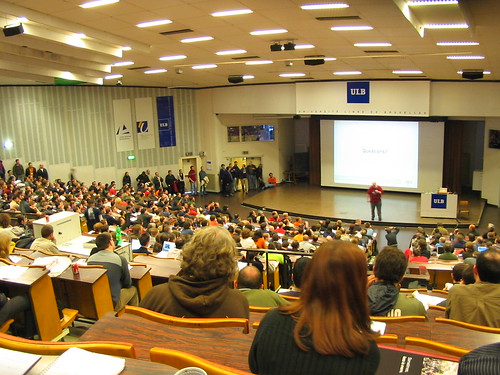
Zaterdag was er Fosdem. Om 8 uur ’s morgens vertrokken kameraad Twanne, Henk en ik richting Brussel. Tip: betrouw nooit op Mappy! Tenzij je de Brusselse ring goed kent stuurt dat ding je gegarandeerd de verkeerde kant uit. Ja, we waren volledig de verkeerde kant uitgereden om in Ukkel te geraken. Soit, dik twee-en-een-half-uur later stonden we aan de ULB. De dag zelf was hectisch en interessant. Naast een aantal interessante lezingen, goodie harvesting (t-shirts! pins! stickers! vrije software!) was het vooral mensjes kijken. En dan vooral, het materiaal dat die mensen meesleurden! De meesten hadden wel een laptop met een geëlaboreerde linuxdistro op geïnstalleerd. Diegene zonder laptop vielen nu eens écht uit de boot op dit event.

Het viel mij op dat er een pak mensen rondliepen met een ibook met linux op! Interessant. Ik ben een beetje een verwend nest als het op software aankomt. Linux is tegenwoordig van die aard dat er sowieso een vrije app bestaat voor wat je wil doen en die je gemakkelijk kan vinden en installeren. Op mac daarentegen ligt dat anders. Ja, je er is veel freeware te vinden, maar de hoeveelheid shareware die je zoekresultaten vervuilt is toch ook niet te onderschatten. Vaak heb ik dan zoiets van “Ja, dit appje is interessant, maar nog maar eens zo’n 30 dagen trial versie, daar heb ik geen zin in.” Kortom, ik ben nu zo’n beetje aan het uitvogelen of linux op mijn ibook een haalbaar project is.

Zaterdagavond ging het dan richting Hobbit voor ribbetjes á volonté. Veel valt daar niet over te zeggen. Lekker kluiven en genieten. De infrastructuur kwam een beetje gammel over maar voor de rest was dat best wel in orde. Nadien zijn we nog in de Cookie’s eet- en praatcafé beland. Die vind je achter De Garre van Corné. Wie dus geen plaats heeft in het ene etablissement, geen nood: het andere is minstens zo gezellig.

En gelukkig was er nu de zondag om wat uit te puffen en de batterijen op te laden tegen morgen…

Fosdem

Foto’s live vanop Fosdem. Ik zit zelfs momenteel in de lezing over LinuxBIOS. Interesting stuff!

OLPC talk

De WiFi verbinding is hier aan de trage kant. Dus véél foto’s kan ik niet zo onmiddellijk uploaden. De rest hebben jullie dus nog te goed.

links for 2007-02-23

Ruby on rails

Het onovertroffen 37signals lanceerde een flinke tijd geleden Ruby on Rails. Een MVC gebaseerd framework waarmee je snel webapplicaties kan ontwerpen zonder over al je energie in de lowlevel stuff te moeten steken. Ik heb al cursorisch één en ander met RoR uitgeprobeerd en ik ben er wel mild enthousiast over. Ik exact wat ik nodig heb: ik kan nu snel iets in elkaar steken zonder dat het mij emmers veel vrije tijd kost.

Alleen, tot nu toe vraag ik mij af welke hoster nu Ruby on Rails support aanbiedt. PHP en Perl, ja! Of ASP.Net! Dat zijn immers de dominante server script talen. Maar Ruby on Rails? Vergeet het! En dat is jammer. Heel jammer. Want waarom zou ik een toepassing ontwerpen in Ruby on Rails, laat staan het zelfs leren gebruiken, als ik geen host kan vinden die mij Ruby on Rails support aanbiedt?

Anderzijds kan ik het ook wel begrijpen, waarom zou een hostingbedrijf tijd en moeite steken om naast PHP ook Ruby on Rails aan te bieden? Het kost tijd en dus geld om zo’n configuratie onderhouden en het is niet meteen gewilde feature nummer 1. Immers, er zijn nauwelijks killer RoR toepassingen zoals PHP die heeft (denk WordPress, Drupal,…). Kortom, een beetje een vicieuze cirkel.

Vandaar dat ik er mij over verbaas dat er een vacature openstaat waar men op zoek is naar iemand die goed beslagen is in Ruby on Rails. Good luck! Denk ik dan zo. Ofwel is het een vacature die op iemands lijf is geschreven…

« Vorige blogposts Pagina 161 van 245 pagina's Volgende blogposts »